
If JavaScript works, why was TypeScript created?
This is the question every JavaScript developer eventually asks. JavaScript runs in every browser, powers most of the web, and doesn't need compiling. So why did Microsoft bother creating TypeScript in 2012?
The honest answer: JavaScript works fine, until your application gets big.
Small scripts rarely cause type-related pain. But once a codebase grows to hundreds of files, dozens of contributors, and thousands of function calls passing data around, JavaScript's flexibility turns into a liability. TypeScript exists to fix that liability without throwing away anything that makes JavaScript useful.
Think of TypeScript not as a new language, but as a safety layer bolted onto JavaScript, a tool that watches your code as you write it and yells at you before your users do.
Why TypeScript Exists?
The problem with plain JavaScript in large applications:
JavaScript is dynamically typed. A variable can hold a number today and a string tomorrow, and JavaScript won't complain:
let user = { name: "Asha", age: 28 };

function greet(user) {
  return "Hello " + user.name.toUpperCase();
}

greet(user);          // Works fine
greet({ name: 42 });  // Runtime crash: 42.toUpperCase is not a function
The bug above is invisible until the exact line executes, which might be deep inside a production app, at 2 a.m., in front of a paying customer.
Runtime errors vs compile-time errors:
This is the core distinction TypeScript is built around.
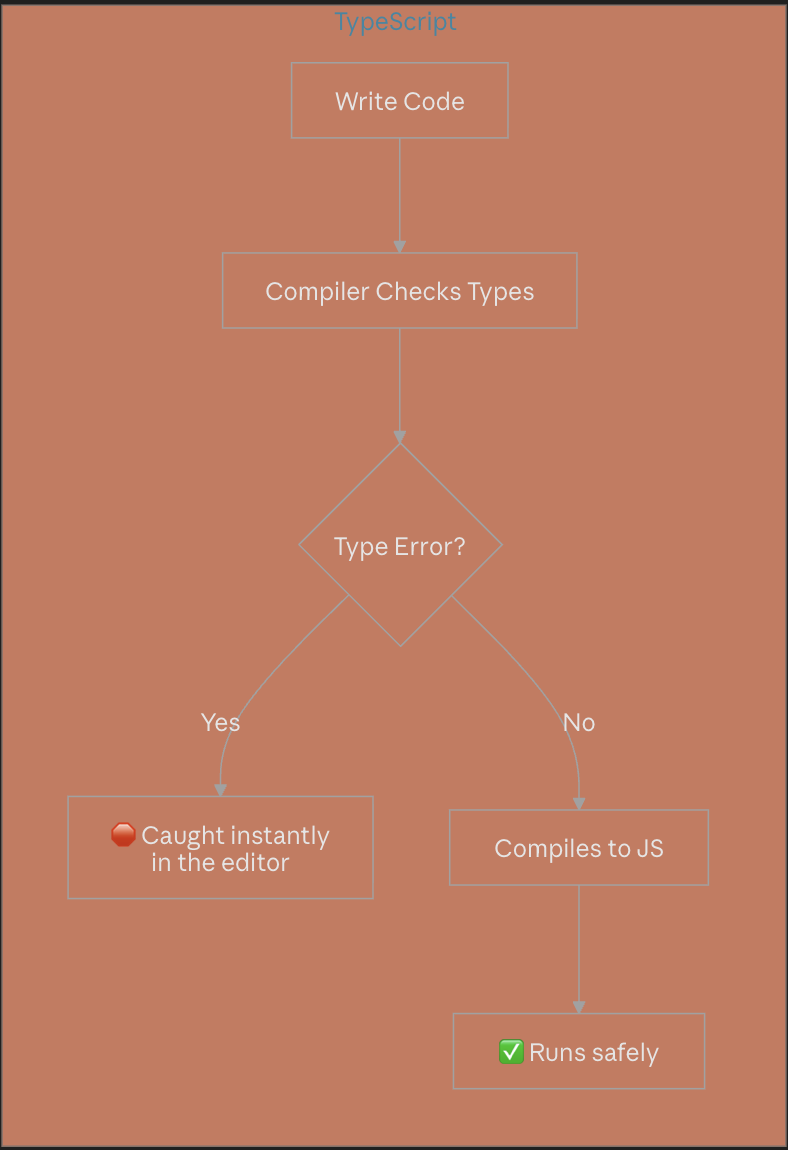
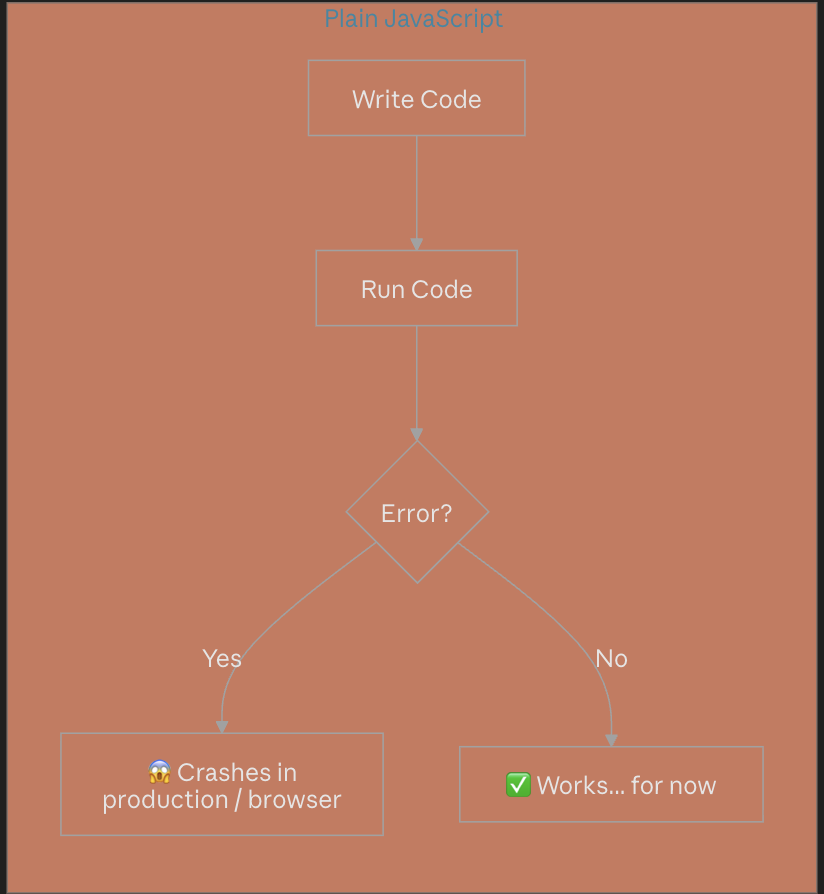
A runtime error happens while the program is executing, often after it's already shipped. A compile-time error is caught the moment you write the mistake, before the code ever runs. TypeScript shifts bug discovery as far left as possible: from "a user found it" to "my editor underlined it in red."
Benefits of static typing:
Self-documenting code — a function signature tells you exactly what it expects and returns.
Autocomplete that actually works — your editor knows the shape of your data.
Safer refactoring — rename a field, and every broken usage lights up immediately.
Fewer "undefined is not a function" bugs — the single most common JavaScript crash.
How TypeScript improves developer productivity?
Modern editors (VS Code especially) use TypeScript's type information to power autocomplete, inline documentation, and instant error checking, even in plain .js files. You spend less time guessing what a function needs and less time debugging typos in property names.
TypeScript as a superset of JavaScript:
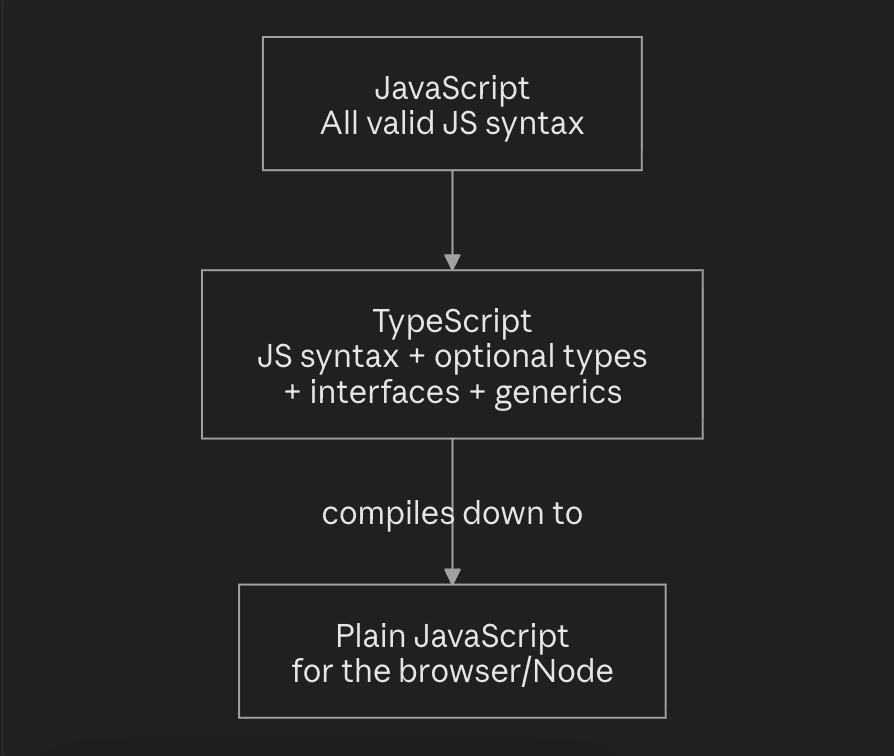
This is the most important mental model to hold onto:
Every valid JavaScript file is already valid TypeScript.
TypeScript doesn't replace JavaScript syntax — it adds optional type syntax on top of it. You can rename app.js to app.ts today, add zero type annotations, and it will still compile. TypeScript only helps when you're ready for it to help.
Understanding Type Annotations
Type annotations are how you tell TypeScript what shape a value should have.
Adding types to variables:
let username: string = "asha_dev";
let age: number = 28;
let isActive: boolean = true;
let tags: string[] = ["admin", "editor"];
If you later try username = 42;, TypeScript stops you immediately:
Type 'number' is not assignable to type 'string'.
Function parameter types:
function calculateTotal(price: number, quantity: number) {
  return price * quantity;
}

calculateTotal(100, "2"); // ❌ Error: Argument of type 'string' is not assignable to type 'number'
Compare this to plain JavaScript, where calculateTotal(100, "2") would silently return "100100" (string concatenation) instead of 200, a bug that could hide in a shopping cart for weeks.
Function return types:
function getUserName(id: number): string {
  return "user_" + id;
}
If the function accidentally returned a number, TypeScript would flag it, because you promised string.
Type inference:
You don't have to annotate everything. TypeScript is smart enough to figure out types on its own:
let price = 499; // inferred as 'number', no annotation needed

Explicit vs inferred types:
| Explicit Typing | Inferred Typing | |
|---|---|---|
| Syntax | let x: number = 5; |
let x = 5; |
| When to use | Function parameters, return types, complex objects | Simple local variables |
| Benefit | Clear intent, works before a value exists | Less code to write |
Rule of thumb: let TypeScript infer simple variables, but always annotate function parameters (TypeScript can't guess what you meant to pass in) and public API return types.
Interfaces vs Type Aliases
This is one of the most common points of confusion for TypeScript beginners, so let's use a real-world example: a User.
What interfaces are?
An interface describes the shape of an object, what properties it must have and what types they are.
interface User {
  id: number;
  name: string;
  email: string;
  isAdmin?: boolean; // optional property
}

const newUser: User = {
  id: 1,
  name: "Riya",
  email: "riya@example.com",
};
What type aliases are?
A type alias does something similar, but is more general, it can name any type, not just object shapes.
type UserType = {
  id: number;
  name: string;
  email: string;
  isAdmin?: boolean;
};

type ID = number | string; // type aliases can also name unions
type Point = [number, number]; // or tuples
Similarities between them:
Both can describe an object's shape, both support optional properties, and both work interchangeably in most everyday code:
function printUser(user: User) { console.log(user.name); }
function printUser2(user: UserType) { console.log(user.name); }
Differences between them:
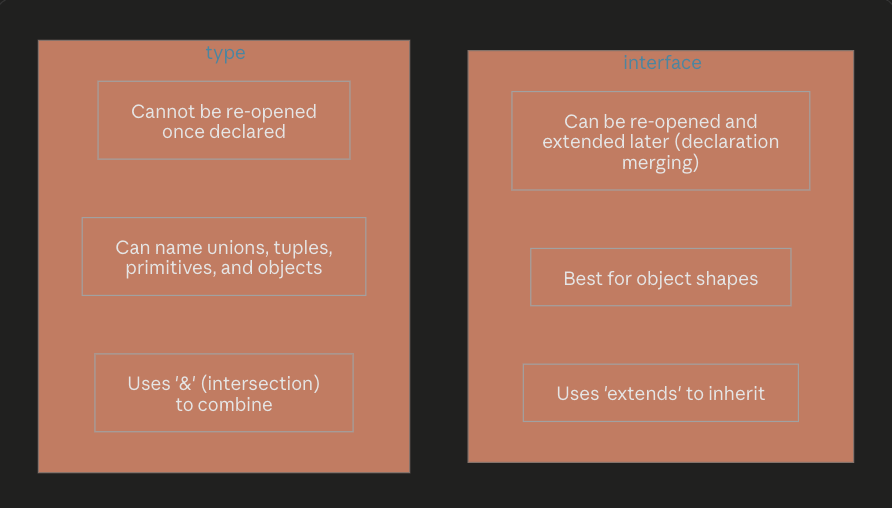
Interface — extending:
interface Person {
  name: string;
}

interface Employee extends Person {
  salary: number;
}
Interface — declaration merging (a unique interface superpower):
interface Config {
  theme: string;
}
interface Config {
  language: string; // merges automatically with the one above
}
// Config now requires: { theme: string; language: string }
Type — combining with intersections:
type Person = { name: string };
type Employee = Person & { salary: number };
When to use interfaces:
Defining the shape of objects, classes, or API responses (
User,Product,Order)When you expect the shape might need to be extended later
As the general convention for public-facing object contracts
When to use type aliases:
Union types (
type Status = "pending" | "shipped" | "delivered")Tuples, function types, or mapped types
Combining multiple types together with
&
Practical guideline: default to interface for objects, and reach for type when you need unions, tuples, or more exotic type shapes.
Union Types
What union types are?
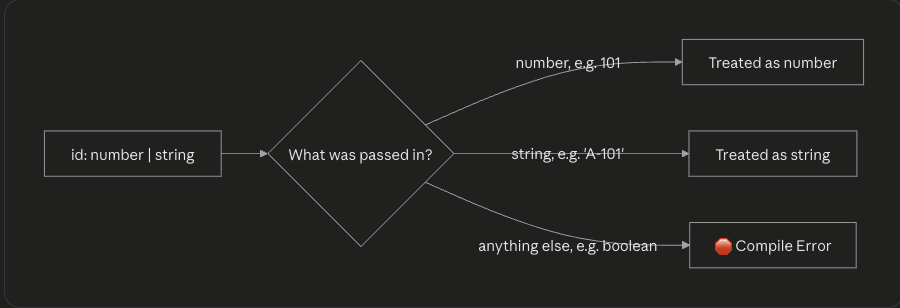
A union type says "this value can be one of several types." Think of it as an "OR" for types.
let orderStatus: "pending" | "shipped" | "delivered";

orderStatus = "pending";   // ✅
orderStatus = "cancelled"; // ❌ Error — not part of the union
Combining multiple possible types:
function printId(id: number | string) {
  console.log("Your ID is: " + id);
}

printId(101);        // ✅
printId("A-101");    // ✅
printId(true);       // ❌ Error
Real-world use cases:
Union types shine when modeling real business states, like an Order that can be in different stages:
interface Order {
  id: number;
  status: "pending" | "shipped" | "delivered" | "cancelled";
}
Or when a function genuinely accepts more than one input shape:
function formatPrice(amount: number | string): string {
  if (typeof amount === "number") {
    return `₹${amount.toFixed(2)}`;
  }
  return `₹${amount}`;
}
Handling unions safely:
TypeScript forces you to narrow a union before using type-specific operations. This is done with a typeof check, as shown above, or other guards:
function describeProduct(value: string | string[]) {
  if (Array.isArray(value)) {
    return value.join(", "); // TypeScript knows it's string[] here
  }
  return value.toUpperCase(); // TypeScript knows it's string here
}
This narrowing process is what makes unions safe rather than chaotic, TypeScript won't let you call .toUpperCase() on something that might be an array.
Intersection Types
What intersection types are?
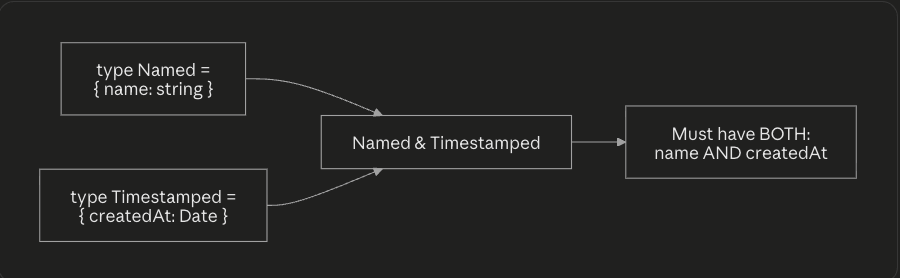
While unions mean "OR," intersections mean "AND." An intersection type combines multiple types into one that must satisfy all of them.
type Timestamped = {
  createdAt: Date;
};

type Named = {
  name: string;
};

type NamedAndTimestamped = Named & Timestamped;

const item: NamedAndTimestamped = {
  name: "Laptop",
  createdAt: new Date(),
};
Combining multiple type definitions:
Creating reusable type structures:
Intersections are perfect for composing small, reusable "building block" types, much like mixins:
type Product = {
  id: number;
  title: string;
  price: number;
};

type Discountable = {
  discountPercent: number;
};

type SaleProduct = Product & Discountable;

const item: SaleProduct = {
  id: 1,
  title: "Wireless Mouse",
  price: 999,
  discountPercent: 10,
};
Practical examples:
A common real-world pattern: combining a base entity type with role-specific extras.
type BaseUser = {
  id: number;
  email: string;
};

type AdminPermissions = {
  canBanUsers: boolean;
  canEditContent: boolean;
};

type AdminUser = BaseUser & AdminPermissions;
This keeps BaseUser reusable across regular users, admins, and moderators, while each role adds only what it needs.
Generic Functions
Why generics are needed?
Imagine writing a function that returns the first item of an array. Without generics, you'd have to either use any (losing all type safety) or write the same function for every type:
function firstOfNumbers(arr: number[]): number {
  return arr[0];
}
function firstOfStrings(arr: string[]): string {
  return arr[0];
}
// ...repeat forever for every type you use
Generics solve this by letting the type itself become a parameter.
Reusable type-safe functions:
function firstItem<T>(arr: T[]): T {
  return arr[0];
}

firstItem<number>([10, 20, 30]);      // returns number
firstItem<string>(["a", "b", "c"]);   // returns string
firstItem([true, false]);             // T is inferred as boolean
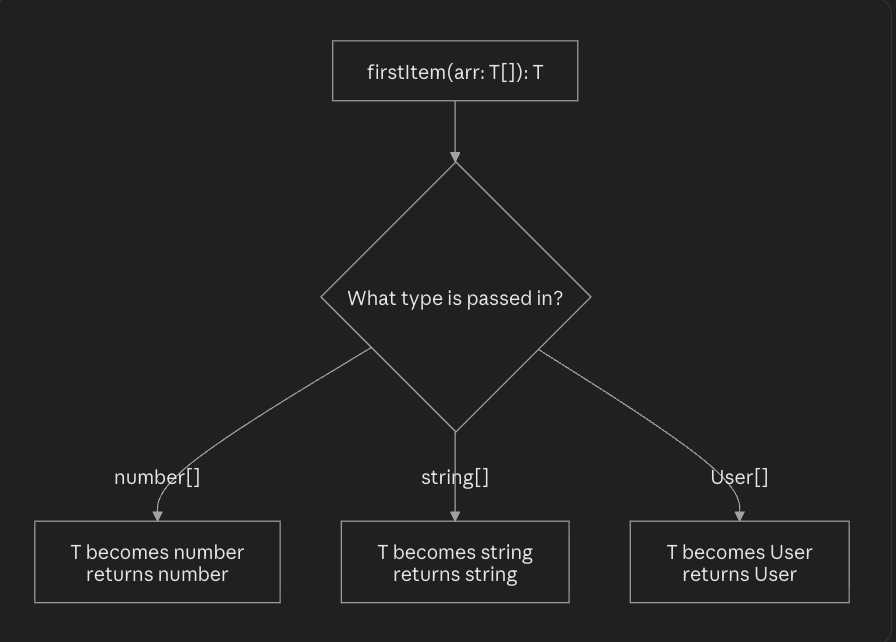
Think of T as a placeholder, a blank slot that gets filled in with the real type the moment the function is called. It's the same function body, reused safely across every type.
Generic parameters:
You can use more than one type parameter, and name them meaningfully:
function pair<K, V>(key: K, value: V): [K, V] {
  return [key, value];
}

pair<string, number>("age", 28); // ["age", 28]
Generics also work great with interfaces, a very common real-world pattern for API responses:
interface ApiResponse<T> {
  data: T;
  success: boolean;
}

const userResponse: ApiResponse<User> = {
  data: { id: 1, name: "Riya", email: "riya@example.com" },
  success: true,
};

const productResponse: ApiResponse<Product> = {
  data: { id: 5, title: "Keyboard", price: 1999 },
  success: true,
};
Generic constraints:
Sometimes you want to restrict what T is allowed to be. The extends keyword adds a constraint:
interface HasId {
  id: number;
}

function printId<T extends HasId>(item: T): void {
  console.log(item.id); // Safe — TypeScript knows every T has an 'id'
}

printId({ id: 1, name: "Laptop" }); // ✅
printId({ name: "No ID here" });    // ❌ Error — missing 'id'
Real-world examples:
A generic function for fetching and typing API data, something almost every frontend app needs:
async function fetchData<T>(url: string): Promise<T> {
  const response = await fetch(url);
  return response.json();
}

const user = await fetchData<User>("/api/user/1");
const products = await fetchData<Product[]>("/api/products");
One function, reused safely across every endpoint in the app, with full autocomplete on the result.
Understanding tsconfig.json
What tsconfig.json is?
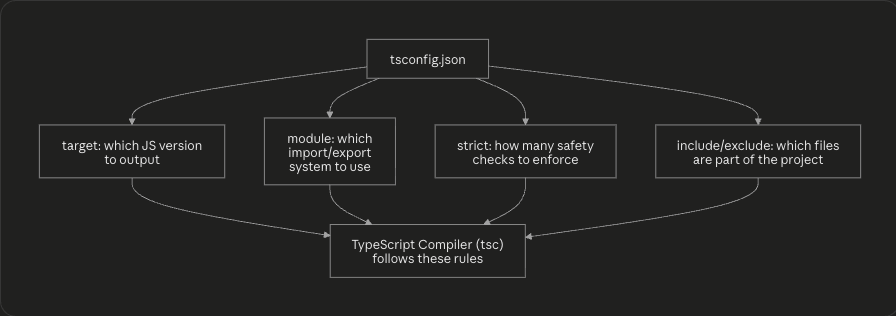
tsconfig.json is the configuration file that tells the TypeScript compiler how to compile your project, which files to include, which JavaScript version to target, how strict to be, and more.
Why TypeScript projects need it?
Without it, you'd have to pass compiler flags manually every time you run tsc. With it, the entire team shares the same rules, and your editor uses it to power live error-checking.
{
  "compilerOptions": {
    "target": "ES2020",
    "module": "ESNext",
    "strict": true,
    "outDir": "./dist",
    "rootDir": "./src",
    "esModuleInterop": true,
    "skipLibCheck": true
  },
  "include": ["src/**/*"],
  "exclude": ["node_modules", "dist"]
}
Common compiler options:
| Option | Purpose |
|---|---|
target |
Which JavaScript version to compile down to (e.g. ES5, ES2020) |
module |
Which module system to output (CommonJS, ESNext) |
strict |
Turns on all strict type-checking rules |
outDir |
Where compiled .js files are written |
rootDir |
Where your .ts source files live |
Strict mode:
"strict": true is a bundle of safety checks, including:
noImplicitAny— variables can't silently becomeanystrictNullChecks—null/undefinedmust be handled explicitly
// Without strictNullChecks:
function getLength(str: string) {
  return str.length; // could crash if str is actually null
}

// With strictNullChecks, TypeScript forces you to guard:
function getLength(str: string | null) {
  if (str === null) return 0;
  return str.length; // now safe
}
Beginners often find strict mode annoying at first, but it's precisely what catches the bugs that plain JavaScript lets slip through.
Target configuration:
target controls how modern the output JavaScript is. Setting target: "ES5" lets your code run on very old browsers by converting modern syntax (like arrow functions) into older equivalents. Setting target: "ES2020" keeps modern syntax intact for newer environments.
Module configuration:
module controls how import/export statements are compiled. Node.js backend projects often use "CommonJS", while modern frontend bundlers (Vite, esbuild) typically use "ESNext".
Project-wide settings:
include and exclude tell the compiler which files belong to the project — typically including your src folder and excluding node_modules and build output.
TypeScript Compilation Process
How TypeScript becomes JavaScript?
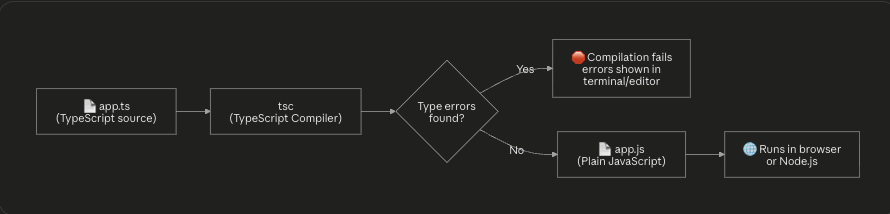
Browsers and Node.js don't understand .ts files, they only understand JavaScript. So TypeScript code always goes through a compilation (technically "transpilation") step, using the tsc compiler, before it can run.
What happens during compilation?
The compiler reads your
.tsfiles and builds an internal model of every type.It type-checks everything, function calls, object shapes, unions, generics.
If no errors are found, it strips out all the type annotations (interfaces,
: string,<T>, etc.) since JavaScript doesn't understand them.It outputs plain
.jsfiles, following the rules fromtsconfig.json(liketargetandmodule).
For example, this TypeScript:
function add(a: number, b: number): number {
  return a + b;
}
compiles down to this plain JavaScript:
function add(a, b) {
  return a + b;
}
All the type information did its job before runtime, and simply disappears from the final output.
Why browsers cannot run TypeScript directly?
Browsers only ship a JavaScript engine (like V8 in Chrome). They have no built-in understanding of interfaces, generics, or type annotations, that knowledge exists only inside the TypeScript compiler. This is exactly why the compilation step is mandatory, not optional.
Build workflow overview:
In a typical real-world project, this compilation step is usually wired into a larger build tool (Vite, webpack, or the tsc CLI directly):
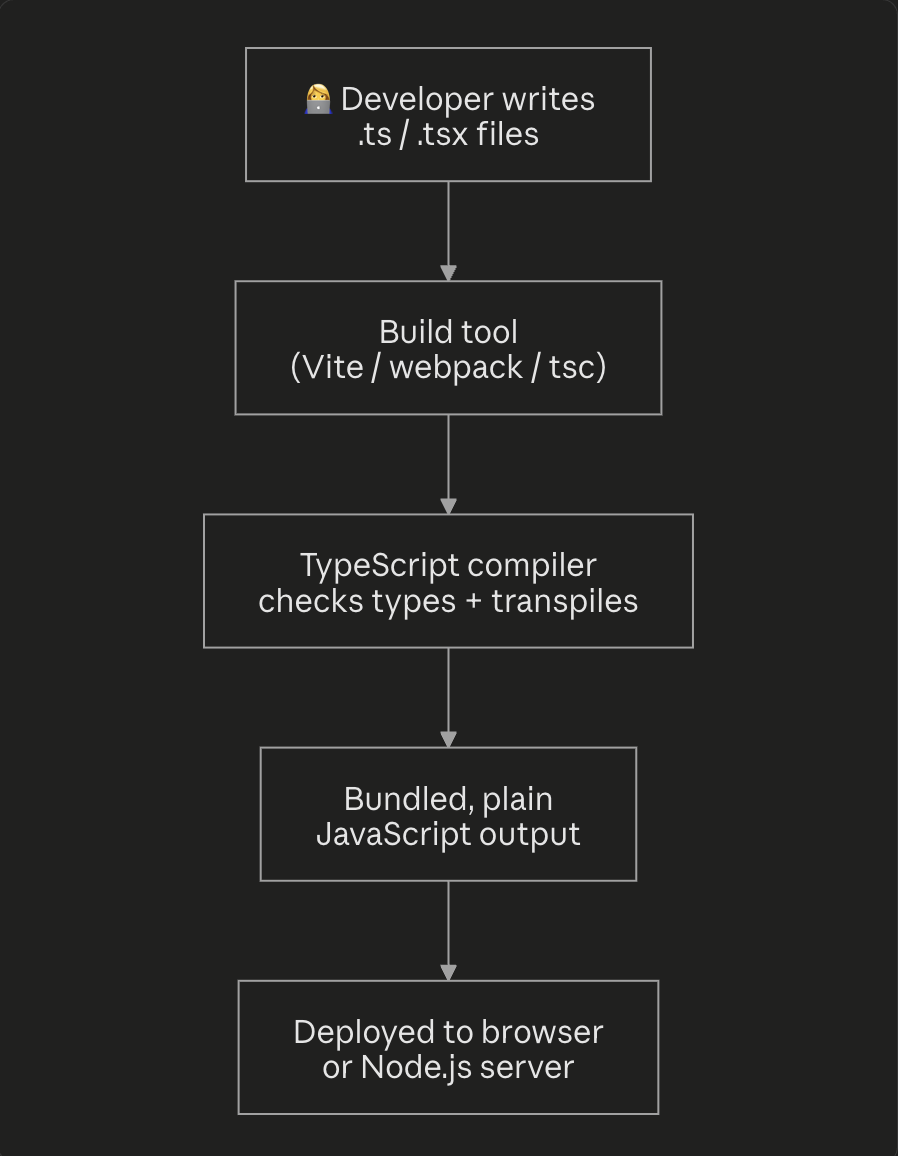
Most teams also run tsc --noEmit in continuous integration, a step that checks for type errors without generating output files, purely as a safety gate before code merges.
Conclusion
Here's the full learning progression this post walked through:

TypeScript isn't a different language you have to learn from scratch, it's JavaScript with a safety net. Start by annotating a few variables and function parameters. Move on to modeling your real data with interfaces. Once that feels natural, unions and generics will click quickly, because by then you'll already be thinking in types.
The payoff compounds as your codebase grows: fewer 2 a.m. production bugs, faster onboarding for new developers, and an editor that finally understands your code as well as you do.


