JavaScript Arrays 101

The Array object in JavaScript, as with arrays in other programming languages, enables storing a collection of multiple items under a single variable name, and has members for performing common array operations.
Why Do we need Arrays?
Objects allow you to store keyed collections of values. That’s fine. But quite often we find that we need an ordered collection, where we have a 1st, a 2nd, a 3rd element and so on. For example, we need that to store a list of something: users, goods, HTML elements etc.
It is not convenient to use an object here, because it provides no methods to manage the order of elements. We can’t insert a new property “between” the existing ones. Objects are just not meant for such use. Hence we use Arrays, to store ordered collections.
How To Create an Array?
There are two syntaxes for creating an empty array:
let arr = new Array();
let arr2 = [];
Almost all the time, the second syntax is used. We can supply initial elements in the brackets:
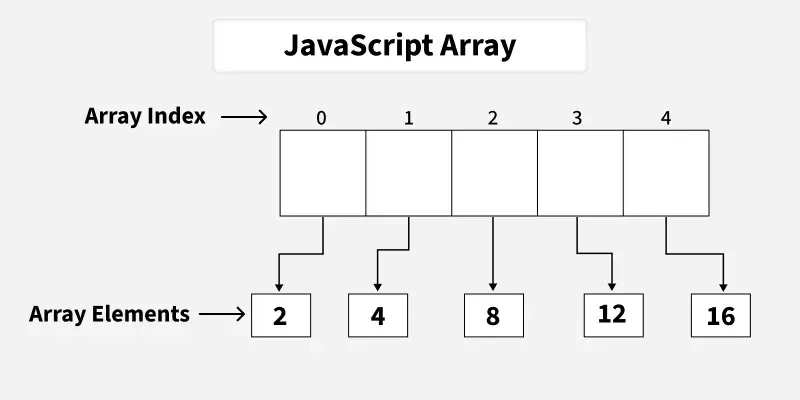
let arr = [2, 4, 8, 12, 16];
Updating an Array
Array elements are numbered, starting with zero.
We can get an element by its number in square brackets:
let fruits = ["Apple", "Orange", "Plum"];

console.log(fruits[0]); // Apple
console.log(fruits[1]); // Orange
console.log(fruits[2]); // Plum
We can replace an element:
fruits[2] = 'Pear'; // now ["Apple", "Orange", "Pear"]
We can also add a new element to the array:
fruits[3] = 'Lemon'; // now ["Apple", "Orange", "Pear", "Lemon"]
Array Length Property
The total count of the elements in the array is its length:
let fruits = ["Apple", "Orange", "Plum"];

console.log(fruits.length); // 3
We can also use alert to show the whole array.
let fruits = ["Apple", "Orange", "Plum"];

console.log(fruits); // Apple,Orange,Plum
The length property automatically updates when we modify the array. To be precise, it is actually not the count of values in the array, but the greatest numeric index plus one.
For instance, a single element with a large index gives a big length:
let fruits = [];
fruits[123] = "Apple";

console.log(fruits.length); // 124
Note that we usually don’t use arrays like that.
Another interesting thing about the length property is that it’s writable.
If we increase it manually, nothing interesting happens. But if we decrease it, the array is truncated. The process is irreversible, here’s the example:
let arr = [1, 2, 3, 4, 5];

arr.length = 2; // truncate to 2 elements
console.log(arr); // [1, 2]

arr.length = 5; // return length back
console.log(arr[3]); // undefined: the values do not return
So, the simplest way to clear the array is: arr.length = 0;.
Basic Loopings over Arrays
One of the oldest ways to cycle array items is the for loop over indexes:
let arr = ["Apple", "Orange", "Pear"];

for (let i = 0; i < arr.length; i++) {
  alert( arr[i] );
}
But for arrays there is another form of loop, for..of:
let fruits = ["Apple", "Orange", "Plum"];

// iterates over array elements
for (let fruit of fruits) {
  alert( fruit );
}
The for..of doesn’t give access to the number of the current element, just its value, but in most cases that’s enough. And it’s shorter.
Technically, because arrays are objects, it is also possible to use for..in:
let arr = ["Apple", "Orange", "Pear"];

for (let key in arr) {
  alert( arr[key] ); // Apple, Orange, Pear
}
But that’s actually a bad idea. There are potential problems with it:
The loop
for..initerates over all properties, not only the numeric ones. There are so-called “array-like” objects in the browser and in other environments, that look like arrays. That is, they havelengthand indexes properties, but they may also have other non-numeric properties and methods, which we usually don’t need. Thefor..inloop will list them though. So if we need to work with array-like objects, then these “extra” properties can become a problem.The
for..inloop is optimized for generic objects, not arrays, and thus is 10-100 times slower. Of course, it’s still very fast. The speedup may only matter in bottlenecks. But still we should be aware of the difference.
Generally, we shouldn’t use for..in for arrays.
Conclusion
Array is a special kind of object, suited to storing and managing ordered data items.
The declaration:
// square brackets (usual)
let arr = [item1, item2...];

// new Array (exceptionally rare)
let arr = new Array(item1, item2...);
The call to new Array(number) creates an array with the given length, but without elements.
The
lengthproperty is the array length or, to be precise, its last numeric index plus one. It is auto-adjusted by array methods.If we shorten
lengthmanually, the array is truncated.
To loop over the elements of the array:
for (let i=0; i<arr.length; i++)– works fastest, old-browser-compatible.for (let item of arr)– the modern syntax for items only,for (let i in arr)– never use.